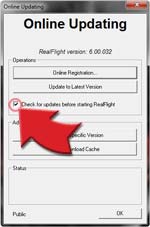
When you check this box, RealFlight automatically looks for updates before starting. It's an easy way to make sure you always have the latest version.

Now you can always have the most current version of RealFlight.
Our RealFlight Development team never stops working on new ways to keep this simulator fresh, exciting, and valuable for improving your skills. Now you don't have to wait for the next version to enjoy the latest innovations — and better still, they cost you nothing.
Periodically, free updates will be available to all registered RealFlight 6 owners. These may include some combination of new airplanes, helicopters, flying sites or gadgets. Just open your software's Launcher, click Additional Options and select Update. RealFlight 6 will automatically search for new updates and download them for you.
Wondering if you missed an update? Check here for the release dates and descriptions. It's easy to keep your copy of RealFlight 6 current.
Please note: These free updates are compatible only with RealFlight 6 — so if you're still flying an earlier version, here's one more good reason to upgrade!
Updates available now.
|
FREE Update C
|
(April 2012)
|

|
Synergy E6 and E7 Helis
When Matt Botos introduced the flybarless Synergy E7 in 2011, he included the parts to build it as a 600-class E-6. This update includes both machines, plus a bonus: the limited edition green canopy. It's available on both versions, the default choice for the E7 and outrageously good looking on either one. Like the carbon-fiber original, both sims offer everything you need to have complete control of performance options. This is one "two-fer" you won't want to pass up.
|

|
Try this option in "engine out" flying
Knowing what to do when your multi-engine plane loses an engine can spell the difference between a controlled landing and a crash. RealFlight 6 is a great way to get the engine out practice you need. You can now choose which engine will fail, so you can fine-tune your practice.
|
|
Add more real-life details to your airports
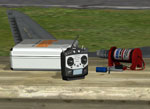
Realism is in the details, and RealFlight 6 has added a wealth of new objects you can use to detail and "realize" your flying site. Objects range from glow plug igniters to fuel jugs to transmitters, tables and more. Look for the full list in the FlexiField Flying Site editor.
|
|
|
Customize the appearance of props
This is a tool for the pilot who wants maximum creative control, and is willing to do whatever it takes to get it. Creating a prop with a completely unique visual requires time, knowledge and software – but it can be done with RealFlight 6.
|
|
FREE Update B
|
(March 2012)
|
|
Gaui 330X-S Quad Flyer
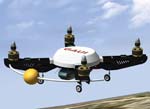
Quad-rotor aircraft are hot, and the Gaui 330X-S Quad Flyer is one of the hottest. Inspired by UAV design and powered by four Scorpion brushless motors, the Quad Flyer is extremely wind-resistant, with a 3-axis gyro for exceptional stability. It also features a collapsible body design to minimize crash damage. Of course, with RealFlight 6, “repairing” damage is as easy as pressing the reset button.
|
|
New customizing options for the NavGuide
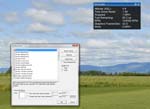
No two pilots use NavGuide exactly the same way, and that's why RealFlight now offers more ways to make it work just the way you want. You can set up custom alerts, delete info you no longer need and take advantage of a huge number of new data items. Another nice feature is that you can super-size the NavGuide screen. There's no longer any need to squint to read tiny type; just make it larger and you can see it clearly and easily.
|
|
|
Add more real-life details to your airports
The KEmax tool on RealFlight now allows you to customize your blades, as well. You can change colors, add texture or a unique pattern. And if you're really ambitious, you can also make sure that the blur disk will reflect your design changes after the blades spool up.
|
|
FREE Update A
|
(February 2012)
|

|
Great Planes F-86 Sabre EDF
The North American F-86 Sabrejet was America's first swept-wing jet fighter, introduced in the late 1940s and developed using German aerodynamic data seized at the end of World War II. The resemblance of this 15” span electric ducted fan model to the original is striking, from its sleek silhouette to the authentic markings and fine details molded into the airframe. Brushless power, full-length ducting and a 30 mm HyperFlow fan combine for exciting performance and a true jet experience.
|

|
Skycrane Helicopter
Throughout the world, flying crane helicopters perform a variety of important roles in civilian and military applications. Typical duties include firefighting, heavy-lift construction, timber harvesting and emergency response. One such aircraft, the American Sikorsky S-64 Skycrane, carries payloads of up to 20,000 pounds. Powered by two Pratt & Whitney turboshaft engines, it reaches 126 mph top speeds and flies to 9,000 feet. Similarly, the RealFlight Skycrane can lift objects of varying size, shape and weight — and will challenge your control skills by reacting accurately to each load!
|
|
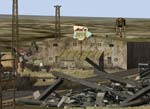
Junkyard Airport 3D Site
If one man's trash is another man's treasure, Jim's Junk junkyard is a virtual gold mine. There's plenty of wide-open airspace for you to explore in this stunning desert landscape, and it's punctuated by towers that might easily serve as pylons. Between the piles of iron beams and other debris, you'll find a large heli pad as well as paved and unpaved airstrips. All RealFlight 6 aircraft are welcome. But let the pieces of planes provide a grim warning: Fly with skill or risk becoming a permanent part of the junkyard!
|
|
|
Customize the appearance of props
This is a tool for the pilot who wants maximum creative control, and is willing to do whatever it takes to get it. Creating a prop with a completely unique visual requires time, knowledge and software – but it can be done with RealFlight 6.
|